
Our Customer Service team is here to help you during each step of the certification process.
Last Updated: Oct 28, 2025
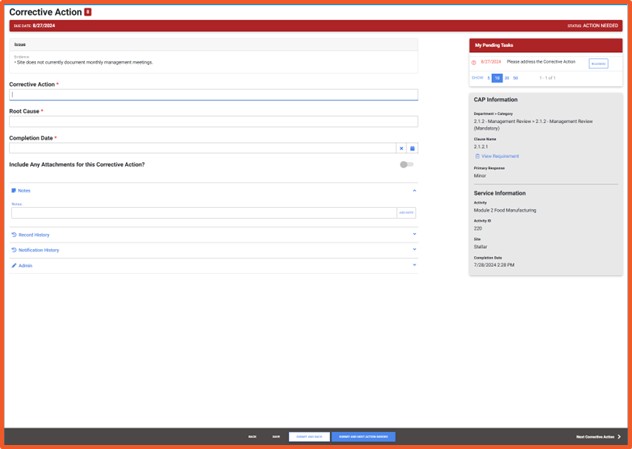
A) Access your audit findings
B) Enter corrective actions
C) Submit to your Certification Body
Your corrective actions are recorded and submitted to your Certification Body. Once accepted, the audit can proceed toward certification decision and closure.
• Cannot see audit findings: Ensure you are opening the correct audit record.
• Upload will not complete: Confirm the file type and size meet system requirements (PDF, JPG, DOCX, under size limits).
• Submitted corrective actions are not showing: Refresh the page or log out and back in.
• Deadline approaching: Contact your Certification Body immediately if you cannot complete actions within the set timeline.
Who reviews my corrective actions?
Your Certification Body reviews all corrective actions and determines if they are acceptable.
How much time do I have to complete corrective actions?
Timeframes are set by SQFI requirements and your CB, typically within 30 days of the audit.
Can I revise a corrective action after it has been submitted?
Yes, if your Certification Body requests revisions, the finding will be returned for updates.
Do I need to submit corrective actions if no non-conformances were found?
No. Corrective actions are only required if non-conformances are issued.
How to Register for an SQFI Multi-Site Audit
How do I log into my account in the SQF Assessment Database?
How do I download my certification report in the SQF Assessment Database?
How do I register my Site in the SQF Assessment Database for an Audit?
How do new customers get started in the SQF Assessment Database?
Privacy Policy |
Terms of Use
251 18th Street S., Suite 1200, Arlington, VA 22202 | Phone: (202) 220-0635
© SQFI. All Rights Reserved.
Web Design & Development by Matrix Group International, Inc.

