
Our Customer Service team is here to help you during each step of the certification process.
Last Updated: Oct 28, 2025
A) Begin audit registration
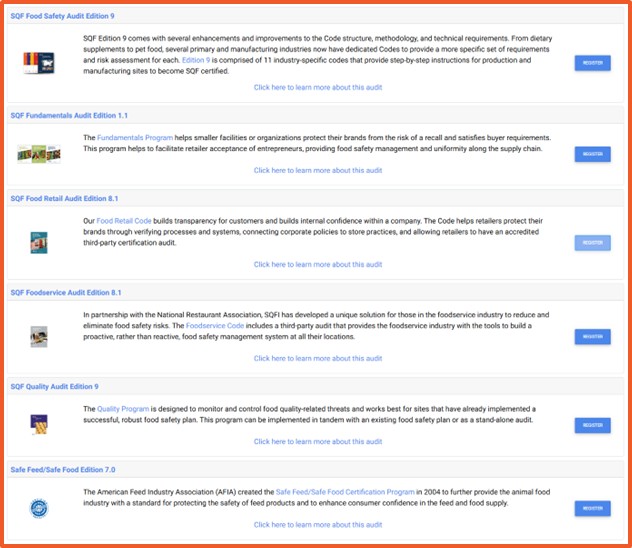
B) Select applicable codes
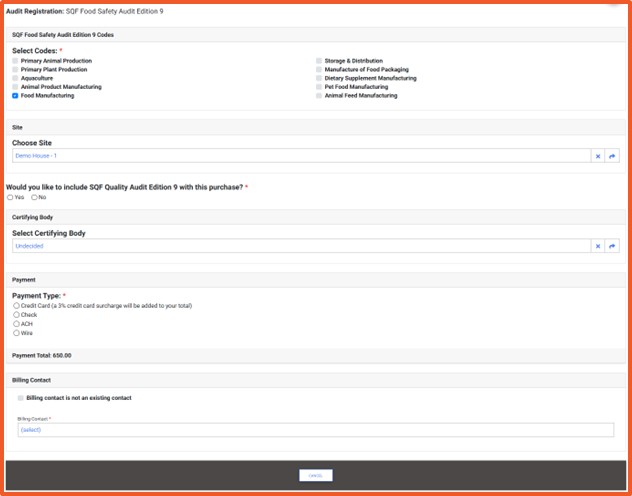
C) Select Certification Body and audit details
D) Submit registration
Your audit registration is now payment pending. After payment, your Certification Body will review your request, schedule the audit, and provide you with audit details.
• Cannot find your Certification Body: Confirm your CB is licensed for your chosen Code. If still missing, contact SQFI Support.
• Audit Registration button missing: Ensure your account is linked to an Organization ID and Site under Corporate Information.
• Submitted the wrong Code: Contact SQFI customer service to update your registration.
• Status says “Pending” for a long period: Follow up directly with your Certification Body, as they control scheduling.
Who is responsible for registering the audit?
The site must register the audit. Certification Bodies can do this on your behalf.
Can I register multiple sites at once?
No. Each site must be registered individually.
When should I register my audit?
Audit registration should be completed before your certificate expires, as per the schedule set by your Certification Body.
Is there a fee for registering?
Yes. Audit registration fees are displayed during the registration process and must be paid in accordance with SQFI requirements.
How do I log into my account in the SQF Assessment Database?
How do I update my registration in the SQFI Assessment Database?
How do I enter corporate information in the SQF Assessment Database?
How do I download my certification report in the SQF Assessment Database?
How do I complete my corrective actions in the SQF Assessment Database?
Privacy Policy |
Terms of Use
251 18th Street S., Suite 1200, Arlington, VA 22202 | Phone: (202) 220-0635
© SQFI. All Rights Reserved.
Web Design & Development by Matrix Group International, Inc.

