Prerequisites
Before attempting to update your registration, confirm that all of the following are true:
- You have access to the SQFI Assessment Database.
- The audit registration status is Payment Pending or Pending Status.
- You are the original owner of the registration:
- If the Certification Body created the registration, only the CB can update it.
- If the site created the registration, only the site can update it.
If you are not the original registrant, the system will not allow you to make changes.
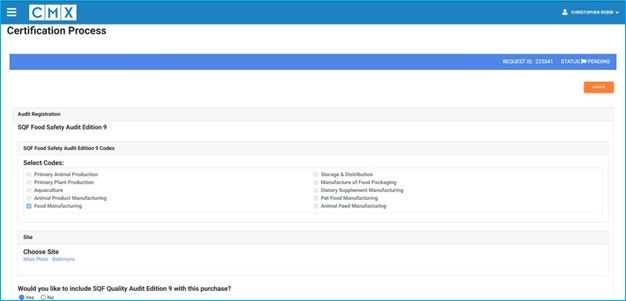
Steps
A) Access your audit registration
- Log in to the SQFI Assessment Database at: https://sqfi.compliancemetrix.com
- From the main menu, select My Audits.
- Locate the audit you need to amend.
- Select View to open the audit details.
Important: If you are attempting to remove a Quality Audit, you must open the associated Food Safety audit. Quality audits cannot be managed independently.
B) Confirm the audit is editable
You can only update a registration if the audit status is:
- Payment Pending, or
- Pending
If the audit has moved beyond Pending, updates are no longer allowed in the system. In that case, contact info@sqfi.com for assistance.
C) Update the audit registration
- Scroll to the bottom of the page and select Update.
- Make the required changes to the registration fields.
Removing a Quality Audit
To remove a Quality Audit from your registration:
- Change your answer to No for the question:
- “Would you like to include SQF Quality Audit Edition 9 with this purchase?”
This action removes the Quality Audit from the registration.
- Scroll to the bottom of the page.
- Select Submit.
This saves your updates in the system.
Result
Your audit registration has been updated successfully, and the revised information has been saved in the SQFI Assessment Database. The audit remains in Pending or Payment Pending status until the next step in the certification process occurs.
I do not see the Update button
- The audit status is no longer Pending or Payment Pending.
- Contact info@sqfi.com to request changes.
I cannot remove a Quality Audit - Ensure you opened the corresponding Food Safety audit, and not the Quality audit itself.
My changes did not save
- Confirm you selected Submit at the bottom of the page.
- Reopen the audit to verify the updates.
FAQs
Can I update a registration after payment is completed?
Yes. Once the audit moves beyond Pending, updates are locked.
Who can make these changes?
Only the owner of the registration can modify it.
- If the Certification Body created the registration on the site’s behalf, only the Certification Body can update/modify it.
- If the site created the registration, only the site user who created it can update/modify it.
What if I need to make a correction after the audit is moved beyond pending?
Contact SQFI Support at info@sqfi.com.


