
Our Customer Service team is here to help you during each step of the certification process.
Last Updated: Oct 28, 2025
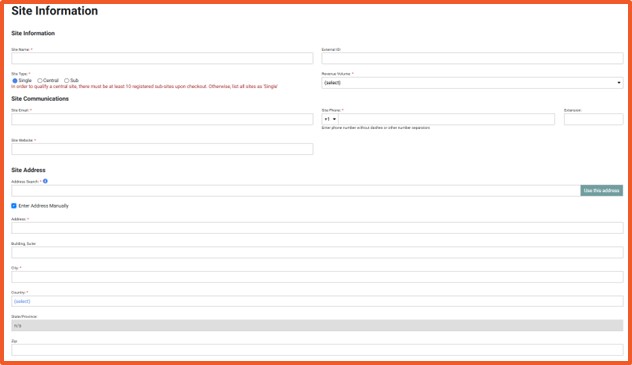
A) Begin site setup
B) Enter site details
C) Enter site address
D) Add site contacts
E) Finalize site setup
Your site has been successfully added to the SQF Assessment Database. You can now proceed with audit registration for this site.
Can I add multiple sites?
Yes. You can add additional sites under the same corporate record by repeating this process.
Do site contacts have to be different from corporate contacts?
Yes. Each site must have its own designated contacts.
What if I need to update site information later?
No. You cannot edit site details by returning to the Site Information page in the database.
Can I change the Site Primary or Billing Contact?
Yes. You can reassign these roles at any time.
Privacy Policy |
Terms of Use
251 18th Street S., Suite 1200, Arlington, VA 22202 | Phone: (202) 220-0635
© SQFI. All Rights Reserved.
Web Design & Development by Matrix Group International, Inc.

