
Our Customer Service team is here to help you during each step of the certification process.
Last Updated: Oct 28, 2025
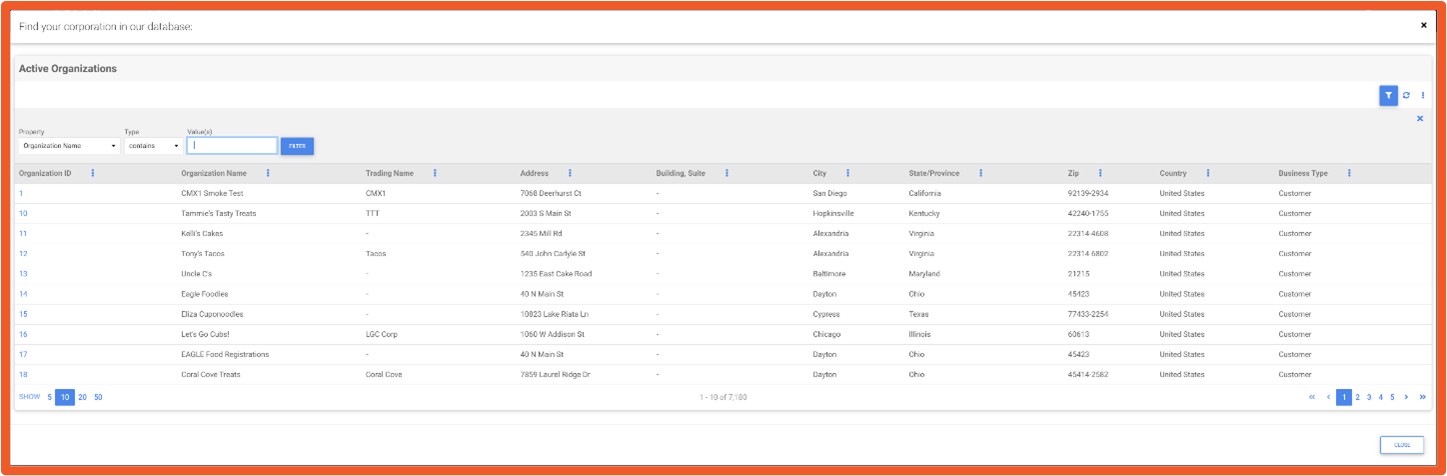
1. After confirming User Registration, you are directed to the Corporate Information page.
2. Click the blue select text to search for your corporate information.
3. In the Values field, type your company name and click the filter button.
4. Select the Organization ID that matches your corporate record.
5. If you cannot find your corporation, close the filter window by clicking the X.
6. Back on the Corporate Information screen, click I CANNOT FIND MY CORPORATION.
7. Enter your Corporate Name (required).
8. Enter Trade Name (optional).
9. Enter a general Corporate Email (not a personal work email).
10. Enter a general Corporate Phone Number (not a personal work phone).
11. In Address Search, begin typing your corporate address and select a suggested option, then click Use this address.
12. If not found, select Enter Address Manually to input details.
13. Enter Address, City, and Country.
14. Once the Country is entered, complete the mandatory State/Province and Zip fields.
15. For State/Province, click select and choose from the dropdown list.
Select the correct Organization ID during the search to avoid duplicate records.
No. Use a general corporate email address for consistency and access control.
What happens after I complete the corporate information?
You will proceed to Entering Corporate Contacts to finish the setup.
How do I register my Site in the SQF Assessment Database for an Audit?
How do I download my certification report in the SQF Assessment Database?
How to Register for an SQFI Multi-Site Audit
How do new customers get started in the SQF Assessment Database?
How do I update my registration in the SQFI Assessment Database?
Privacy Policy |
Terms of Use
251 18th Street S., Suite 1200, Arlington, VA 22202 | Phone: (202) 220-0635
© SQFI. All Rights Reserved.
Web Design & Development by Matrix Group International, Inc.

